I listened to a great talk recently called Stop Using Classes by Peter Diedrich. The talk goes through some of the unhelpful ways classes can be used in Python and makes good points about readability and simplicity. Here's my mindmap of the talk.
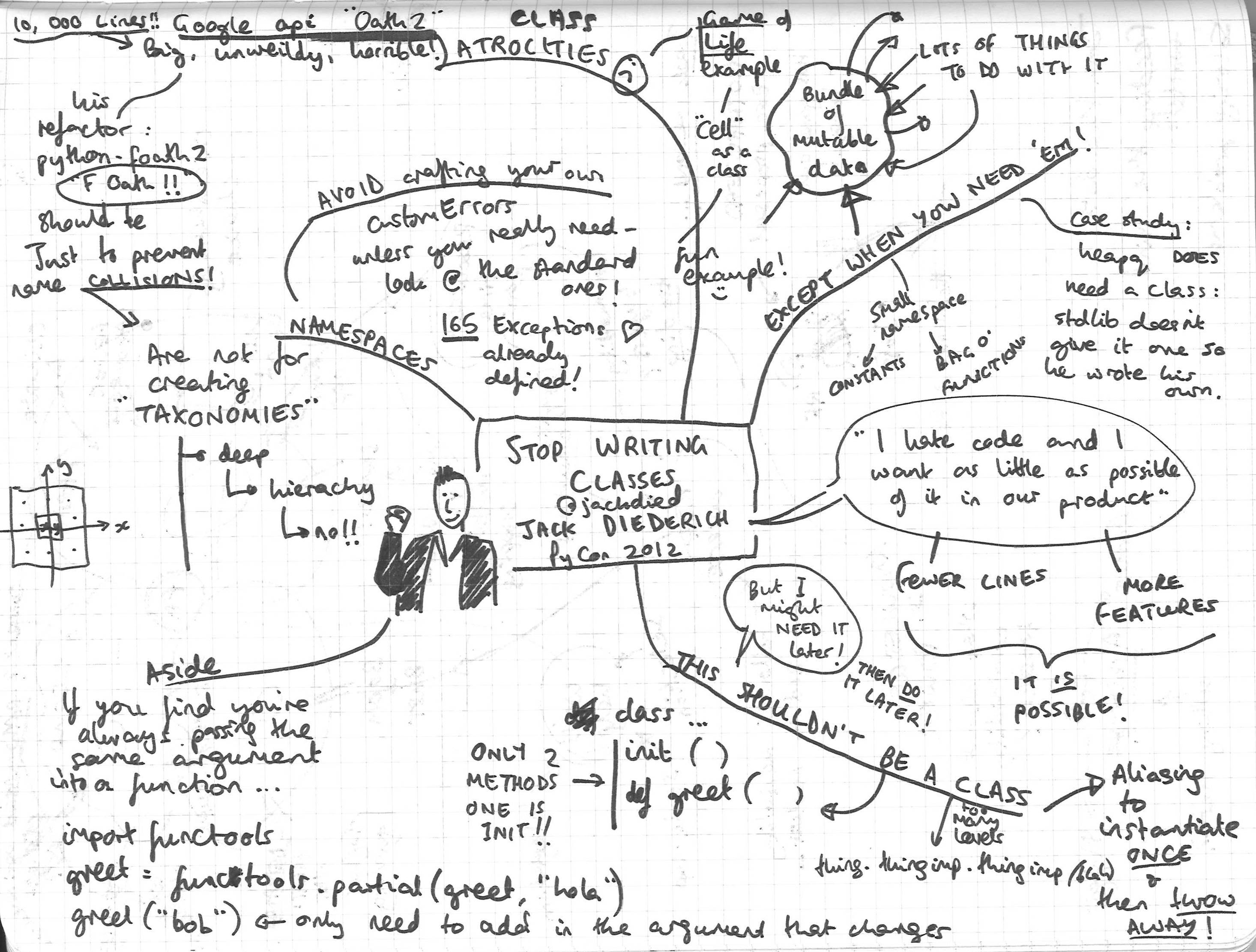
Game of Life
Diedrich uses as an example a neat implementation of Conway's Game of Life which is beautifully straightforward and avoids the tempting trap of making a class for a Cell, a class for a Board, etc. His example is so small I've copied and annotated it here (renamed a few of the variables for extra clarity):
""" Example Game of Life from 'Stop Writing Classes' talk by Jack Diedrich. """
import itertools


def neighbours(point):
    x, y = point
    yield x+1, y-1
    yield x+1, y
    yield x+1, y+1
    yield x, y-1
    yield x, y+1
    yield x-1, y-1
    yield x-1, y
    yield x-1, y+1


def advance(board):
    new_state = set()  # initialises a set with a blank list inside
    friends = set(itertools.chain(*map(neighbours, board)))
    cells_we_care_about = board | friends

    for point in cells_we_care_about:
        count = sum((cell in board)
                    for cell in neighbours(point))
        if count == 3 or (count == 2 and point in board):
            new_state.add(point)

    return new_state


glider = set([(0,0), (1,0), (2,0), (0,1), (1,2)])

for i in range(1000):
    glider = advance(glider)

print glider
What friends does requires some unpacking. First of all, *map(neighbours, board) takes the iterable returned from map(neighbours, board) and returns it. The * is a useful way to split up the returned single thing from map into each piece and feed them separately to the chain() function as arguments. Here's an example of * in action:
def hallo(arg1, arg2):
     print(arg1)
     print(arg2)
     print("Hallo!!")

>>> printme = ("Yes", "Indeed")
>>> hallo(printme)
Traceback (most recent call last):
  File "/usr/lib/python3.5/code.py", line 91, in runcode
    exec(code, self.locals)
  File "<input>", line 1, in <module>
TypeError: hallo() missing 1 required positional argument: 'arg2'
>>> hallo(*printme)
Yes
Indeed
Hallo!!
This map() iterable is the function neighbours() applied to every point in board. So map(neighbours, board) returns sets of all the live cells' neighbours. This is used as an argument to the chain() function. What chain() does is glues groups of iterable things together into a chain object. For example:
>>> import itertools
>>> love = itertools.chain("123", "DEF")
>>> print love
<itertools.chain object at 0x7fe58ada5810>
>>> for item in love:
...     print item
...
1
2
3
D
E
F
>>> sling_it_into_a_set = set(love)
>>> print sling_it_into_a_set
set(['D', 'E', 'F', 1, 2, 3])
>>>
So it bungs all the sets of neighbours into one single set. Because of how Python sets work, this gets rid of any duplicate points - eg points which neighbour a couple of living cells should still only be mentioned once.
| is just Python's binary OR operator - so cells_we_care_about is a set which contains all points that are in the list of live cells OR the list of their neighbours
count counts neighbours for each living and dead cell. Diedrich then applies the rules for Conway's Game of Life in one line:
A dead cell that has 3 live neighbours becomes alive
A live cell that has 2 live neighbours remains alive
* Every other cell dies.
Sets are awesome
One of the reasons his implementation is so tidy and has so few lines is his great use of set(), one of the built-in Python types. Sets are particularly great for this problem because they contain only unique elements - if you try to add multiples of the same element to a set you only end up with one in there. This means any duplicate points are eliminated without having to think about it.
For more examples of how to get good use out of Python's built-ins I recommend Built in Super Heroes by the excellent Dave Beazley.
I decided to make a personal website a while back, to play around with web stuff for the first time. Taking the path of least resistance I used Github Pages - they give you a free 'Personal' static website which is rather nice. I cobbled together some CSS and HTML and made something that looked as if it had emerged from the 90s. It was perfectly fine for what I wanted to do, which was host little JavaScript games I was playing with writing - I had never written JavaScript before and wanted to give it a try.
Now I'd like to make this website into a blogging platform, and make it look a bit better, too. Rather than hand-coding everything from scratch (and still having something that looks as if it emerged from the 90s), I wanted to start out with something I can modify for myself with only a bit of effort.
I explored a bewildering range of different static website generators, trying to work out what I should use. According to this list there are over 100 of these out in the wild now! Even narrowing myself down to only the Python flavours (on the theory that I want to be able to tinker deeply with the webpages I create) left me with far too much to choose from. So I asked around friends and on the advice of Hannah McLaughlin I went for Pelican.
Getting Pelican up and running was not as easy as the docs would like you to believe (ah, if only...). So as nearly all first-time Pelican users must do, if the examples in the Pelican Themes page are anything to go by, my first blog post here will be a tutorial - mostly for my own reference - on how to use Pelican. I found that Amy Hanlon's post on the subject was most helpful, as she doesn't tend to assume any 'obvious' prior knowledge from the reader.
First Steps
In the terminal, set up a new virtual environment for all your Pelican business (good practice). Then make a directory for the website and initialise Pelican in there. These steps went without incident.
mkvirtualenv pelican
setvirtualenvproject
workon pelican

pip install pelican
pip install Markdown
mkdir Website
cd Website
pelican-quickstart
Pelican's quickstart does allow you to get off the ground pretty fast by setting things up the way you'd like after asking a series of questions. There was an option to say I wanted to upload my site using GitHub Pages - perfect. Say 'yes' to auto-reload & simple HTTP script to assist with developing theme and to create Fabfile/Makerfile. It spits out some basics:
content            Makefile        pelicanconf.pyc
develop_server.sh  output          publishconf.py
fabfile.py         pelicanconf.py
pelicanconf.py is where your local configuration sits - that's what you want to alter when you're tweaking the webpages you display. publishconf.py is the file that deals with published web pages, eg analytics etc - we're not going to mess with that. content is the folder where you bung all your Markdown (.md) or reStructuredText (.rst) files for all those great blog posts. Pelican will also recognise the folder names images and pages automatically - these are where your pictures and the different webpages you create (aside from the blog posts) will go. output is the folder where the final CSS and HTML live, and it's the part that should be posted to wherever you're doing your web hosting.
Problem 1 - no Themes
I try and host my new website locally to see what it looks like - and it looks like crap! It's because I don't have any of the lovely themes loaded. I try exactly what the Pelican Themes page recommends: git clone themes into ~/home/user/pelican-themes and add a line in the pelicanconf.py file, like so:
THEMES = "/home/user/pelican-themes/blue-penguin"
Sanity check: do I have any themes installed?
(pelican)sandmanuser@sandman-VirtualBox:~/Website$ pelican-themes -l
notmyidea
simple
No. How strange. I did clone pelican-themes locally:
git clone https://github.com/getpelican/pelican-themes
But since I didn't clone --recursively, the actual configuration files for each theme weren't copied. When I go in and look, it's just a bunch of empty folders. Yes, because now when I try to clone it takes forever! Now we're cooking on gas, and when I run make html and then make serve I see that it's looking pretty. Ctrl+C stops the server.
Problem 2 - not updating local server
I discover what must be another common problem - I go change a webpage to try something else out, hit make serve and find that it won't run:
socket.error: [Errno 98] Address already in use
Makefile:77: recipe for target 'serve' failed
make: *** [serve] Error 1
Woops! Looks like I didn't actually switch off the server I made to try things out - it was still running in the background. It turns out the nicest way of dealing with this is to use the shell script they've kindly made for you - just run
./develop_server.sh start and ./develop_server.sh stop
to start the development server and stop it again nicely. This also updates your webpages locally live - as soon as you make and save a change to them, the development server updates your webpage so you can see how things look in real time.
Why didn't you tell the world?
So far this website is only working on a little server-in-a-bottle we've created in our own computer. Time to take it to the web! Since I'm hosting my site with GitHub Pages, my user site on GitHub is where I'm going to push the contents of my output folder to.
I'm going to create a separate repository for the rest so I can back up my Markdown files, tweak my Theme and rebuild the website from different computers.
This requires a little careful thought when it comes to .gitignore and how we refresh the output folder.
And once you've gotten everything working...
You might want to do a freeze to capture the packages you installed & make it easier on yourself moving to another computer.
pip freeze > requirements.txt